Violation Details Menu

This menu is available to both the Adjudicator and the Supervisor.
Note that the DVL option is only visible and available to VMS installations for which a Roster Server has been installed.
Details
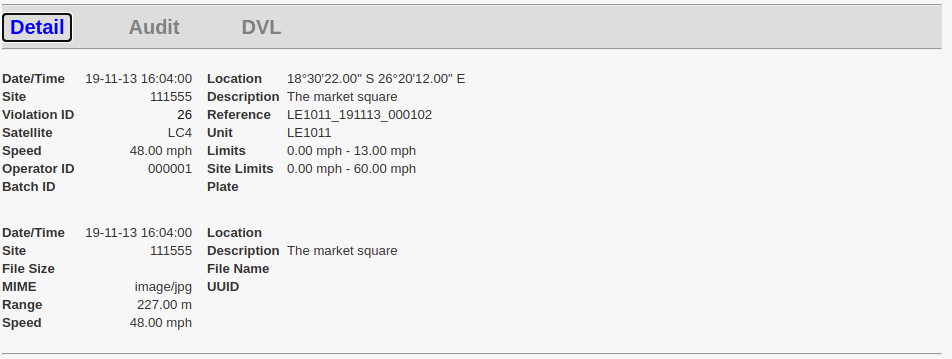
Violation Details
Date/Time |
The date and time that the violation was acquired |
Location |
Geographic Latitude and Longitude. Not always available |
Site |
Site Code |
Description |
Site description |
Violation ID |
Unique VMS assigned ID for this violation |
Reference |
Reference to the violation assigned by the acquisition equipment (camera) |
Satellite |
Type acquisition equipment. e.g !DCam, LaserCam4, etc |
Unit |
Usually the serial number of the acquisition equipment |
Speed |
The maximum recorded vehicle speed |
Limits |
Minimum and maximum speed limits as specified by the recording camera. Not always available. |
Operator ID |
Operator of the acquisition equipment (camera) |
Site Limits |
Speed Limits assigned to the Site Code |
Batch ID |
Export batch - if the violation has been exported |
Plate |
Vehicle registration number - if available |
Evidence Details
These details replace the ANPR Details when an item of evidence is selected for display in the Main Image.
Date/Time |
Recorded date & time |
Location |
Geographic Latitude and Longitude. Not always available. |
Site |
Recorded Site - may differ from the summary above |
Description |
Site description. |
File Size |
Size in bytes |
File Name |
Name of the file in which the evidence was saved on the LFR |
MIME |
Multipurpose Internet Mail Extensions. File type. |
UUID |
Universally Unique Identifier (UUID) - is the LFR's unique key of this file. |
Range |
Camera to vehicle range in meters |
|
|
Speed |
Vehicle Speed |
|
|
ANPR Details
These details replace the Evidence Details when an ANPR image is selected.
Date/Time |
Recorded date & time |
|
|
Plate |
Registration Number |
Location |
Geographic Latitude and Longitude. Not always available |
Delta Time |
Time difference between ANPR image and violation recording. |
Distance |
Distance to the vehicle (if available) |
Source |
Device responsible for the ANPR image 'Name[serialNo] |
UUID |
Universally Unique Identifier (UUID) - is the LFR's unique key of this file. |
Audit
This table is a historical record of all the relevant events and rulings associated with this violation.
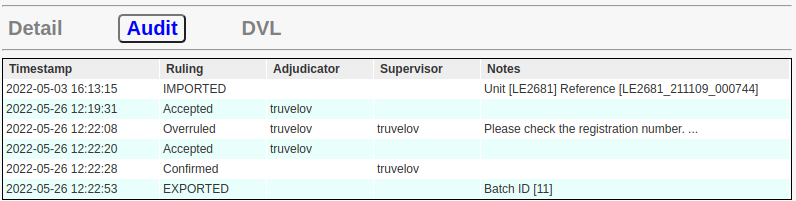
The columns denote the following ...
Timestamp: The date and time at which this ruling or event occurred.
Ruling: Records the Import, Export events and all Rulings applied to this violation.
Adjudicator: The username of the adjudicator responsible for the ruling.
Supervisor: The username of the supervisor responsible for confirming the ruling.
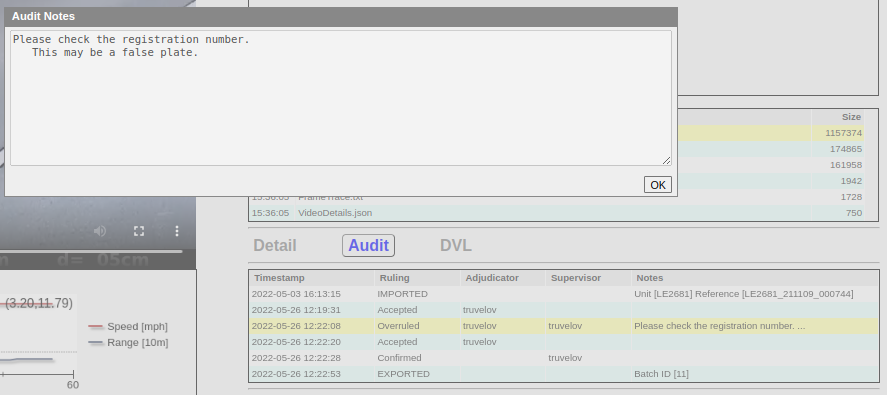
Notes: A summary of the event or ruling details. Notice that the 'Overruled' entry comment is followed by three ellipses (...) which indicates that this is a multi-line comment.
Note that whenever a violation is overruled, the Adjudicator column will contain the username of the Adjudicator to whom the violations were forwarded.
Clicking on an item with a 'Notes' entry will display the full details as illustrated below.
DVL (Driver Vehicle Licence)
This panel is constructed by one of many possible VMS Roster applications and displays details pertaining to the specified registration plate and driver/owner. Note that the contents of this display will in general vary between VMS installations. The following are just some examples:
UK (Civil Enforcement)
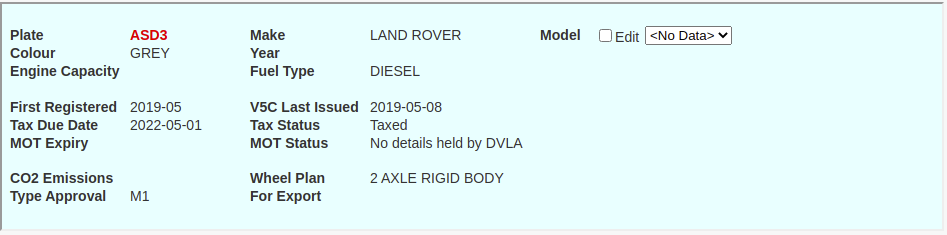
In this instance the user may optionally provide the vehicle model, but this is not required.
USA
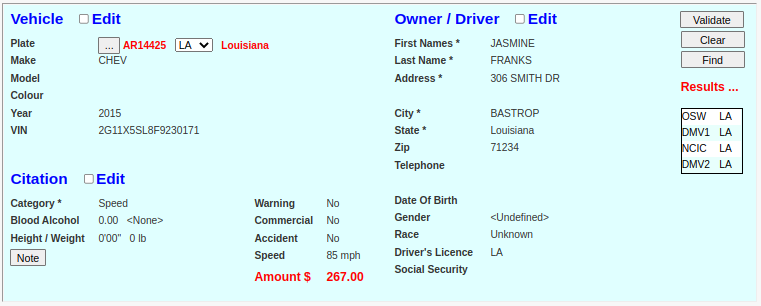
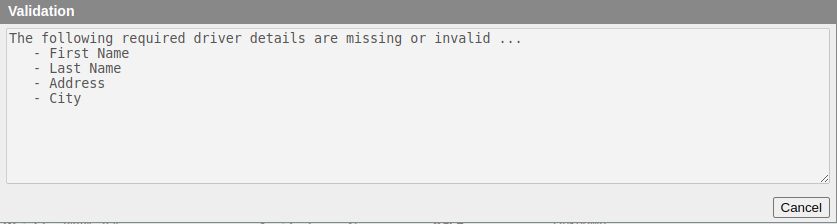
In this instance the user may provide additional vehicle, driver, and citation details. Only those fields indicated by an asterisk * are required. Failure to provide the necessary information will result in and error message such as the following:
To edit the 'Vehicle', 'Owner / Driver', or 'Citation' elements, simply click the associated 'Edit' checkbox. For instance, clicking the 'Citation' edit checkbox will yield the following display:
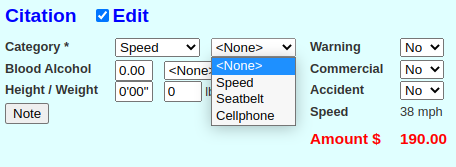
In this case only a single 'Speed' violation has been automatically selected, but a second 'Seatbelt' or 'Cellphone' violation may also be added manually.
Notes
- The listed options are defined by appropriate (pre-configured) database entries.
- The total citation amount is the sum of all the values associated with each selected offence.
Sources
The Sources listed under the Results ... heading represent data sources that have responded to a request for information regarding this vehicle plate. Clicking one of these items will result in a dialog box similar to the following example.
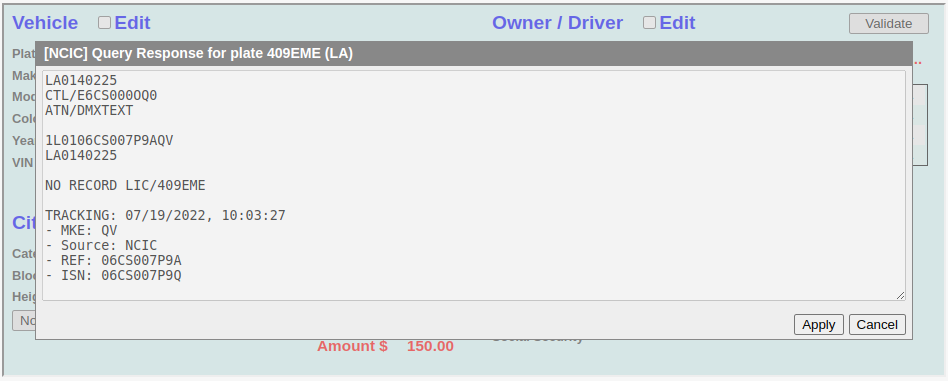
In this instance the displayed NCIC data request result indicates that no details were found from this source. If the Apply button is clicked, then the system will attempt parse/extract any useful information and merge it into the background form. Note that not all source replies are currently parsed, and parsing of a particular data source is only applied to data sources whose reply format is stable and fixed.
Note that multiple data sources may be merged into the form in such a manner that any pre-existing data is not overwritten.
UK (Legacy)
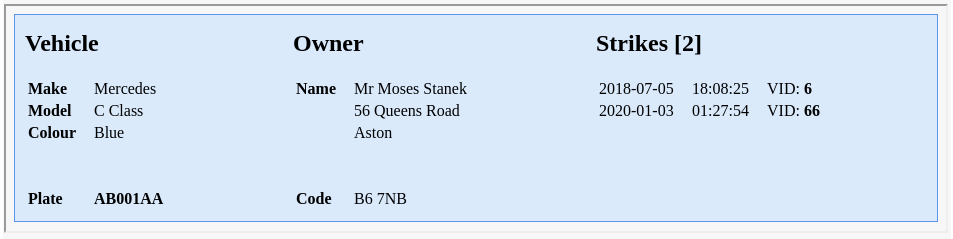
If no details are available then, depending upon the defined installation/setup, the following panel may be displayed.